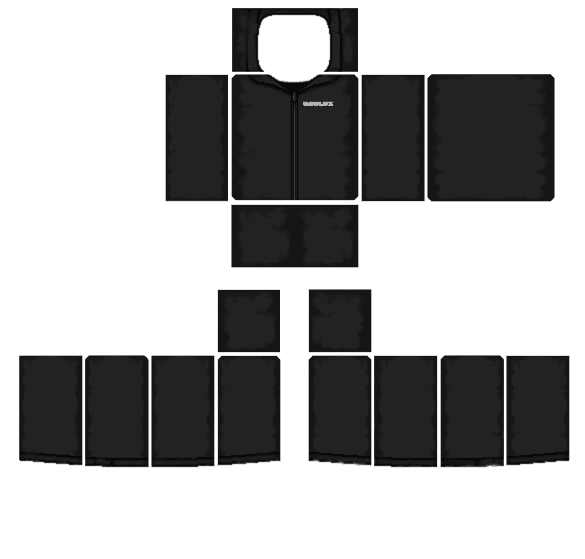
creatify logo
creatify logo

Create

Templates

Collections

Join Discord

creatify logo
creatify logo

Create

Templates

Collections

Join Discord

HomeTemplatesRoblox Shading Templates for Realistic Clothes
8 Transparent 585×559 Wrinkle & Fold Overlays

Roblox Shading Templates for Realistic Clothes

8 Distinct 585×559 PNGs IncludedShirts, Tees, Hoodies, Jeans, Suits & CorsetsTransparent PNG Ready

If you color a shirt or pants with a plain flat color, it can look like a plastic box in the game. Dropping a see-through Roblox shading template on top of your color adds pre-drawn wrinkles, collar shadows, pockets, and fabric folds in seconds—without having to draw every shadow by hand.

Whether you need a short-sleeve Roblox tee shirt shading template, a baggy Roblox shirt shading template for hoodies and jackets, or a Roblox pants shading template with denim pockets and knee creases, every shading template Roblox creators use must fit the 585 × 559 pixel layout. Scroll through our 8 different Roblox shading template transparent PNGs below, test each Roblox shaded template on a 3D avatar, or open the BloxLux 3D Clothing Editor.

Browse All 8 Shading PNGs (585×559)Open 3D Shading Editor
How Shading Layers Work585 × 559 px

How the 3-Layer Shading Stack Works

Every Roblox shading shirt template goes on the top layer so the see-through wrinkles sit over your colors and logos without covering them up.

L3
Top Layer — Transparent Shading PNGMultiply Mode • 35%–55% Opacity • Wrinkles & Folds
Multiply
L2
Middle Layer — Your Color & LogosNormal Mode • 100% Opacity • Shirt Color & Text
Normal
L1
Bottom Layer — 585×559 Box GuideGuide Only • Hide Before Saving PNG
Guide
Works in BloxLux, Photopea, IbisPaint X & GIMPTest in 3D
8 Different 585 × 559 Transparent Shading Templates

Download Transparent Roblox Shading Templates (Scroll All 8 Styles)

Every clothing style needs its own shape and wrinkle pattern. A short-sleeve T-shirt leaves the lower arms transparent, a hoodie needs a front pouch pocket and hood, and jeans only shade the waist and legs. Scroll sideways through all 8 roblox shading template png styles below to download the 585 × 559 file or test it on the 3D avatar.

Swipe or Scroll (8 Styles)
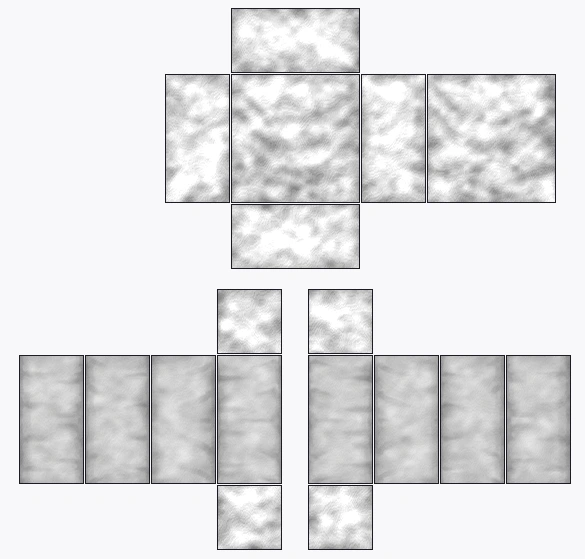
01 • Crumpled WrinkleTransparent PNG
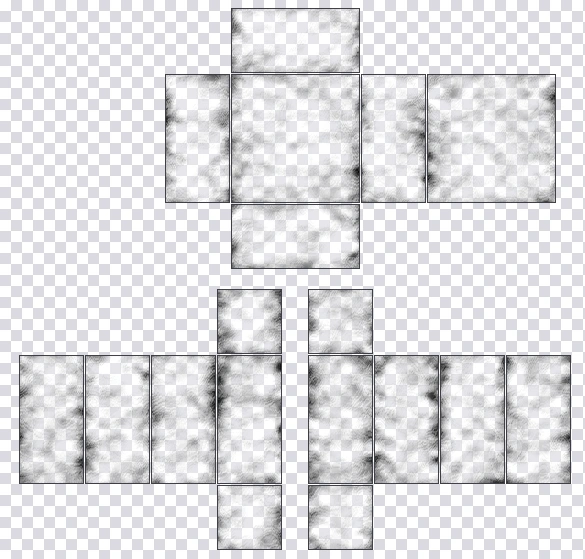
Classic Crumpled Cloth Shading Template - 585x559 transparent Roblox shading template PNG585 × 559 px

Classic Crumpled Cloth Shading Template

Transparent checkerboard base with organic pinched seam wrinkles & soft folds

The classic all-around Roblox shirt and pants shading template. Features natural crumpled cloth wrinkles around every seam with a clear center so your base color shines through.

585 × 559 PNG35%–50% MultiplyCheckerboard Transparent
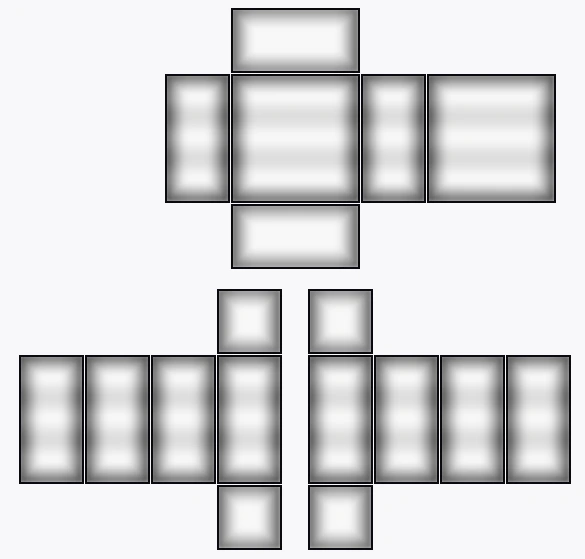
02 • Pillow VignetteTransparent PNG
xDoku-Style Pillow & Border Shading Template - 585x559 transparent Roblox shading template PNG585 × 559 px

xDoku-Style Pillow & Border Shading Template

Bold black UV outlines, deep airbrushed edge shadows & soft horizontal bands

Inspired by the popular DeviantArt xDoku shading style. Uses smooth dark border shading around all 18 body boxes with soft horizontal chest and sleeve highlights.

585 × 559 PNG30%–45% MultiplyBold Edge Vignette
03 • Diagonal CreasesTransparent PNG
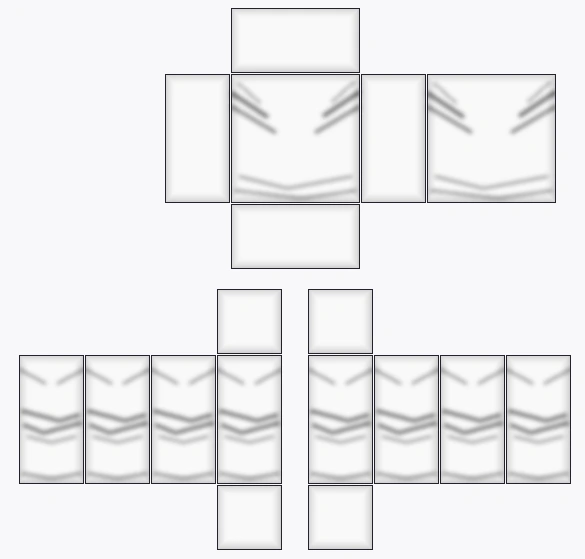
Diagonal Seam Crease & Cross-Hatch Template - 585x559 transparent Roblox shading template PNG585 × 559 px

Diagonal Seam Crease & Cross-Hatch Template

Crisp angled fabric pull lines from the side seams with a rounded collar dip

Great for clean anime shirts, uniforms, and fitted tops. Features crisp diagonal crease lines pulling inward from the left and right seams across the chest, back, and sleeves.

585 × 559 PNG35%–50% MultiplySharp Seam Lines
04 • Soft AirbrushTransparent PNG
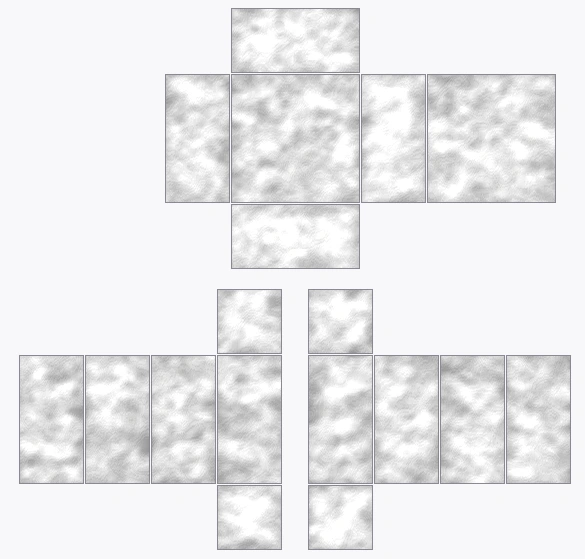
Soft Airbrush Mist & Smooth Fold Template - 585x559 transparent Roblox shading template PNG585 × 559 px

Soft Airbrush Mist & Smooth Fold Template

Feathery light-gray airbrushed clouds & gentle diagonal fabric ripples

Made for white, pastel, and Y2K aesthetic clothes where heavy black shadows would look too harsh. Adds a soft, cloudy airbrushed texture across the whole outfit.

585 × 559 PNG25%–40% MultiplySoft Pastel Ready
05 • Dark & Black ClothesTransparent PNG
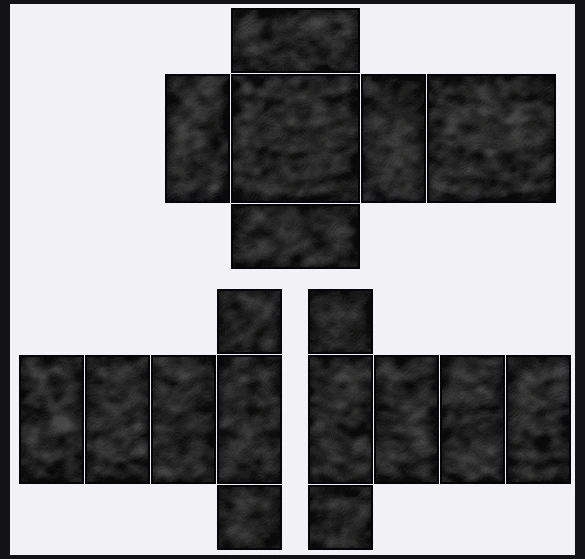
Dark Charcoal & Black Clothing Shading Template - 585x559 transparent Roblox shading template PNG585 × 559 px

Dark Charcoal & Black Clothing Shading Template

Pre-shaded dark charcoal fabric with lighter fold ridges for black outfits

Normal shadow layers disappear on pure black clothes. This dark-base template uses deep charcoal tones and soft gray highlights so every wrinkle stands out on black shirts and pants.

585 × 559 PNGDark Base ReadyCharcoal Highlights
06 • Shoulder & ElbowTransparent PNG
Minimalist Shoulder & Joint Fold Template - 585x559 transparent Roblox shading template PNG585 × 559 px

Minimalist Shoulder & Joint Fold Template

Focused armpit tension lines, waist tucks & middle elbow bend creases

Places wrinkles only where clothes bend—at the shoulders, waist, elbows, and wrists—leaving the middle of the chest completely clean for your front logos and decals.

585 × 559 PNG30%–45% MultiplyClean Center Chest
07 • Line-Art HoodieTransparent PNG
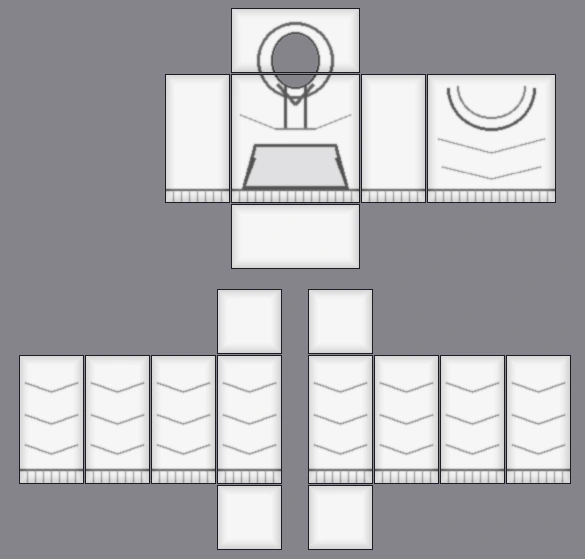
DevForum Line-Art Hoodie & Pocket Template - 585x559 transparent Roblox shading template PNG585 × 559 px

DevForum Line-Art Hoodie & Pocket Template

Drawn hood collar cutout, front drawstrings, kangaroo pouch & ribbed cuffs

Modeled after the classic Roblox DevForum hoodie template. Includes a round neck opening, back hood lines, hanging drawstrings, a front pouch pocket, and ribbed cuffs.

585 × 559 PNG40%–60% MultiplyHood + Pocket + Cuffs
08 • Heavy RealisticTransparent PNG
Heavy Realistic Cloth Drape & Pants Template - 585x559 transparent Roblox shading template PNG585 × 559 px

Heavy Realistic Cloth Drape & Pants Template

Deep U-shaped chest drapes & hand-painted baggy sleeve and leg creases

Built for heavyweight streetwear, oversized sweaters, and baggy cargo pants or jeans. Combines deep U-shaped torso drapes with realistic stacked folds down the arms and legs.

585 × 559 PNG45%–60% MultiplyShirts + Baggy Pants
Live 3D Wrinkle & Seam Previewer

Interactive 3D Shading Studio (Test All 8 Templates Live)

See how each Roblox shading template 585 x 559 wraps around the 3D chest, arms, waist, and legs. Pick any of the 9 presets on the left to swap the live texture, and spin the avatar 360° across Blocky, Boy, and Girl bodies.

Select 3D Shading Preset9 Live Maps • Scroll ↓
Ready for Your Own Colors & Logos

Want to put these shading layers over your own shirt or pants colors? Open the 3D Editor to stack layers and paint live.

Open 3D Shading Editor
Loading 3D Avatar Preview...
Viewing Complete Shaded Outfit (Hoodie + Jeans)
Complete Shaded Outfit (Hoodie + Jeans)2D UV Map
Easy Shading Settings Guide

Multiply Opacity Settings and How to Shade Black Clothes on Roblox

The biggest mistake beginners make with a Roblox shaded shirt template is leaving the shadow layer at 100% opacity or using pitch black (#000000) underneath a shadow layer. Here are the best settings for every color.

01 • Best Opacity Setting35% – 55% Opacity

Setting Your Shading Layer Opacity

When you drop a Roblox shading template transparent PNG over a colored shirt, set the layer mode to Multiply. For white, pastel, and bright colors, turn the shading layer opacity down to 30%–45% so the wrinkles look soft and clean instead of muddy gray.

02 • Black Clothing Trick#1C1C24 Base Color

How to Shade a Black Shirt or Hoodie

If you fill a shirt with pure black (#000000), dark shadows won’t show up at all. When using a Roblox shading template for black shirt or dark hoodies, color your shirt with dark charcoal gray (#1C1C24 to #24242E) so the darker wrinkles and light folds stand out in-game.

03 • Short Tee vs Long SleeveShort vs Full Arms

Short-Sleeve Tee Shading vs Full-Sleeve Shirt Shading

A Roblox tee shirt shading template leaves the bottom half of the arm strips completely transparent so your avatar’s bare forearms show below the short-sleeve cuff. If you are making a long-sleeve sweater, jacket, or hoodie, use a full-sleeve template that covers the entire arm down to the wrist.

04 • Clean Side SeamsFits R15 & R6

Why Wrinkles Need to Line Up Across All 4 Sides

Real clothes bunch up where your body bends—under the arms, at the elbows, around the waist, and behind the knees. All 8 of our 585 × 559 shading templates line up the folds at the exact same height across the Front, Left, Back, and Right boxes so your wrinkles connect smoothly around the body.

Recommended Shading Settings for Different Clothing Colors

Tested for Roblox In-Game Lighting
Clothing TypeBest Base Color HexShading Layer OpacityHighlight TipBest Template to Use
White & Light Pastel Tees#F4F4F8 – #FFE6EE30% – 40% Multiply10% Soft WhiteShort-Sleeve Tee or Classic Shirt
Bright Streetwear & Jerseys#3B82F6 / #9965E545% – 55% Multiply15% Chest HighlightClassic Shirt or Zip-Up Jacket
Black & Dark Grunge Hoodies#1C1C24 – #25253060% – 75% Multiply15% – 20% Light GrayOversized Hoodie & Pocket
Baggy Jeans & Suit Outfits#2B4C7E / #23252E45% – 60% Multiply15% Front Knee & LapelDenim Jeans or Suit Blazer
Step-by-Step 3D Shading Guide

How to Use Roblox Shading Templates in the BloxLux 3D Editor

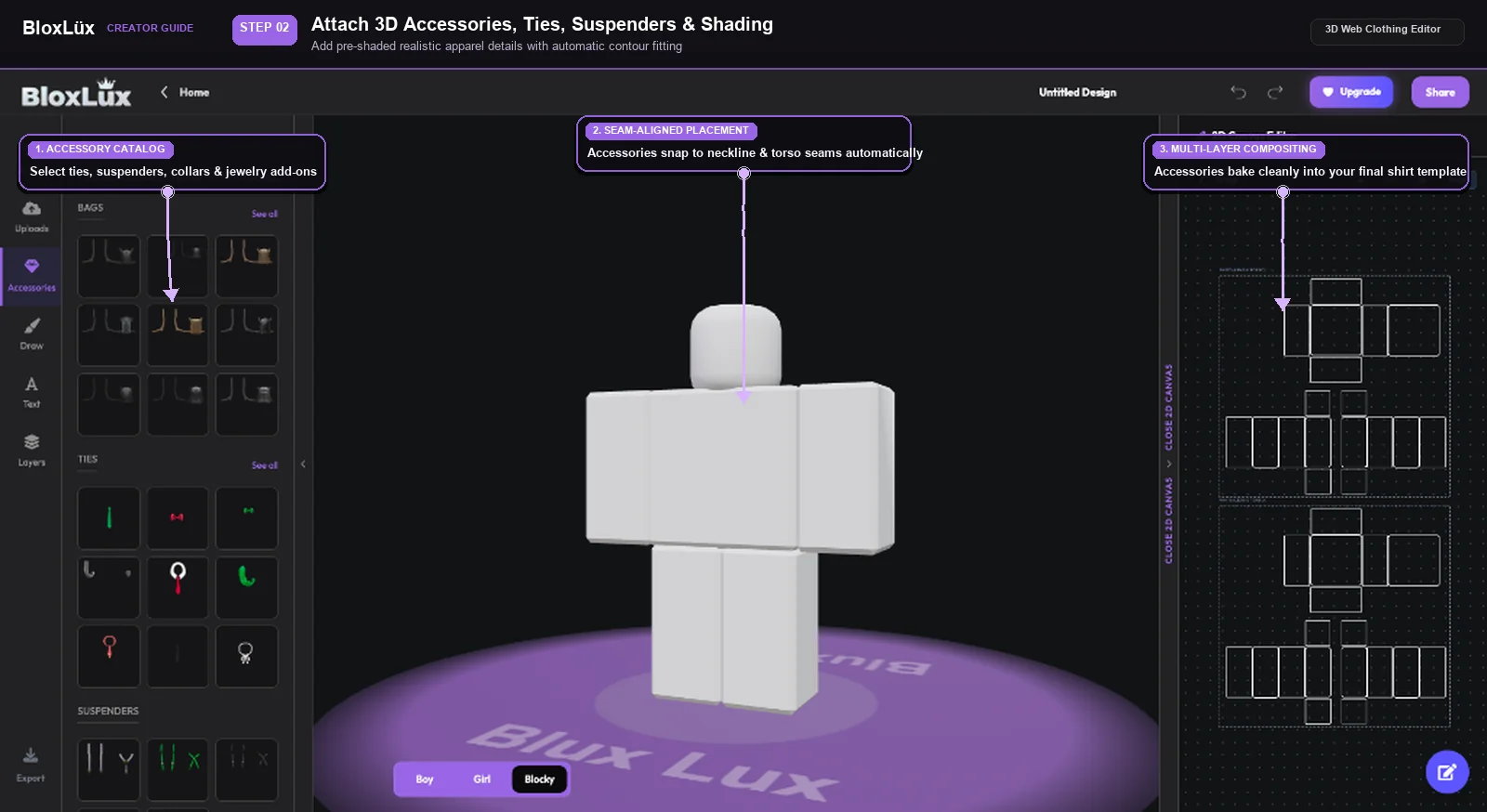
You don’t need complicated computer software to use a Roblox shading template. Inside the BloxLux 3D Web Editor, you can upload any see-through shading PNG, brush your own soft shadows with the Airbrush tool, and add pre-shaded 3D accessories while watching your avatar update live.

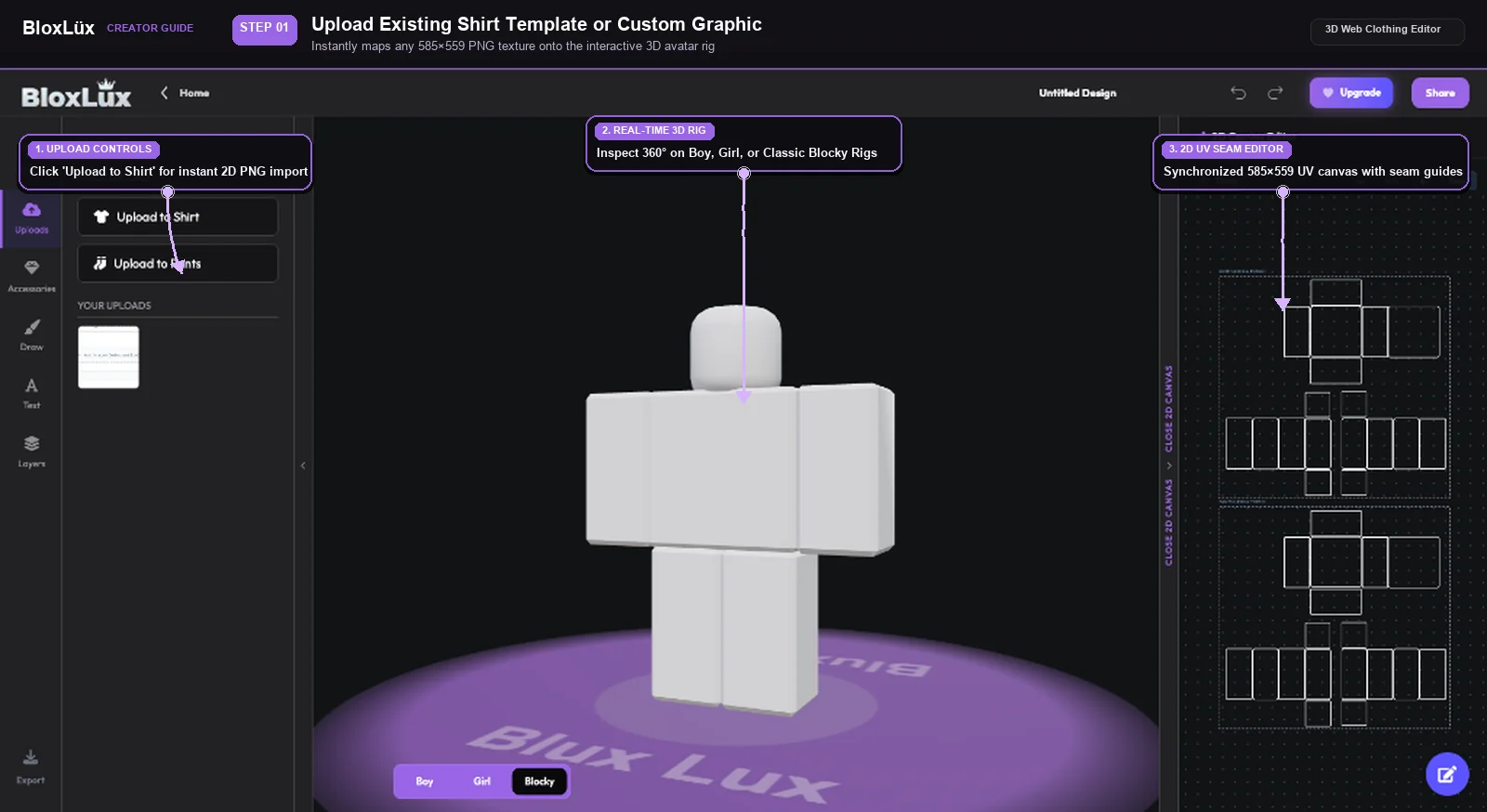
Uploading a 585x559 transparent Roblox shading template into the BloxLux 3D clothing editor
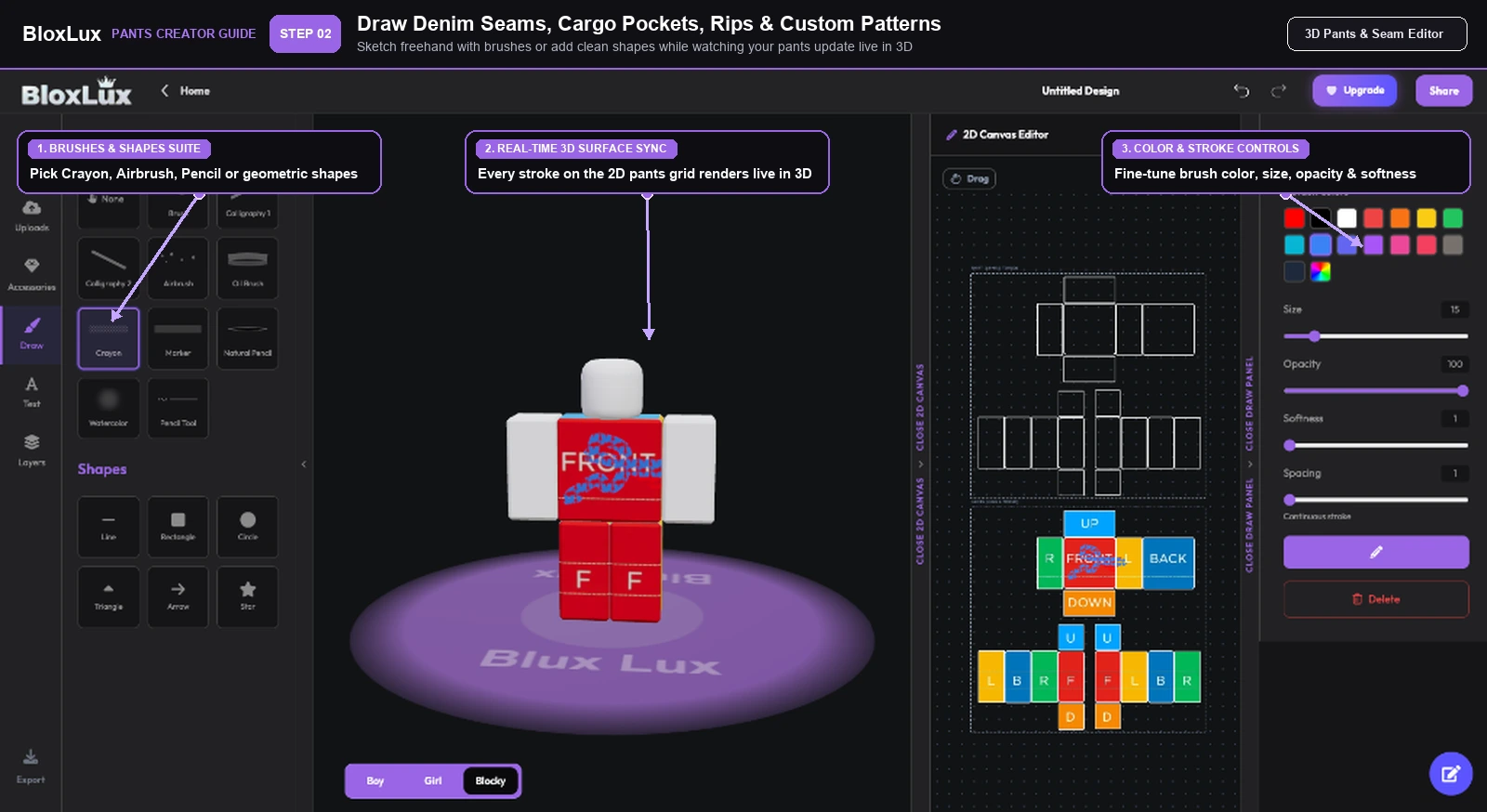
Painting custom wrinkle shadows on a Roblox shading template using Airbrush softness and opacity controls
Adding pre-shaded 3D accessories with built-in drop shadows onto a Roblox shirt shading template
Step 01 of 03•Layer Stacking

Drop Any 585×559 Transparent Shading Template Over Your Color

Stack see-through wrinkle overlays right on top of your shirt or pants color in seconds

Open 3D Web Editor

First, color your shirt or pants with any solid color you like. Next, open the Uploads tab on the left and upload one of our 585×559 transparent shading PNGs. Because the shading file is see-through, your base color and chest logos show right through underneath the wrinkles.

Lines up automatically with the 585×559 Shirt or Pants layout
Keeps your base colors and chest logos visible underneath
Updates the 3D character right away so you can check the folds

Helpful Tip — When making a black shirt or hoodie, use dark charcoal gray (#1C1C24) instead of pitch black (#000000) so the dark wrinkles still show up clearly.

Pre-Shaded Community Outfits

Popular Shaded Shirts and Outfits Ready to Remix

See how top creators shade hoodies, suits, jackets, and jeans—or click Remix in 3D to edit any outfit.

8 Shaded Outfits
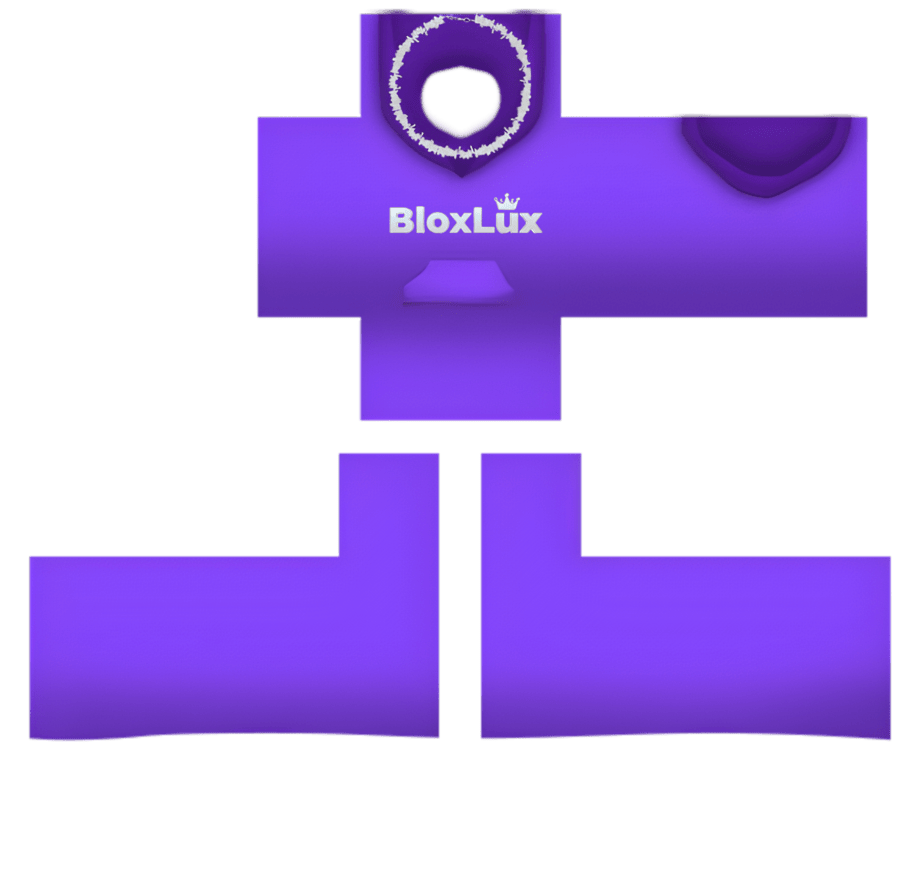
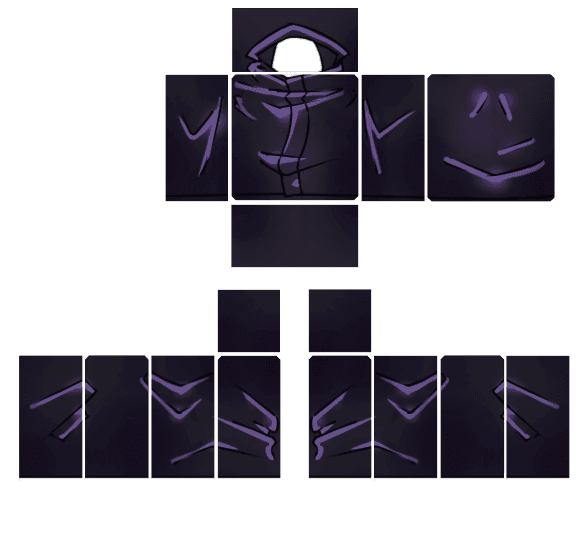
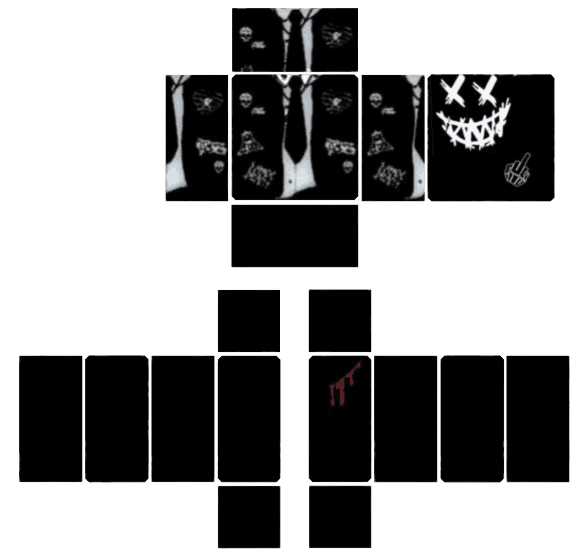
Dark Sorcerer Shaded Uniform - Transparent Roblox Shirt Template PNG
Remix in 3DView Details
Dark Sorcerer Shaded Uniform
by coolkid585×559
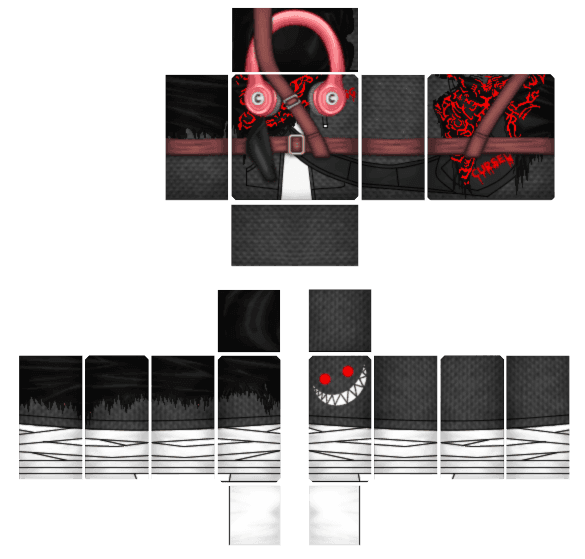
Shadow Stalker Shaded Coat - Transparent Roblox Shirt Template PNG
Remix in 3DView Details
Shadow Stalker Shaded Coat
by Zoro585×559
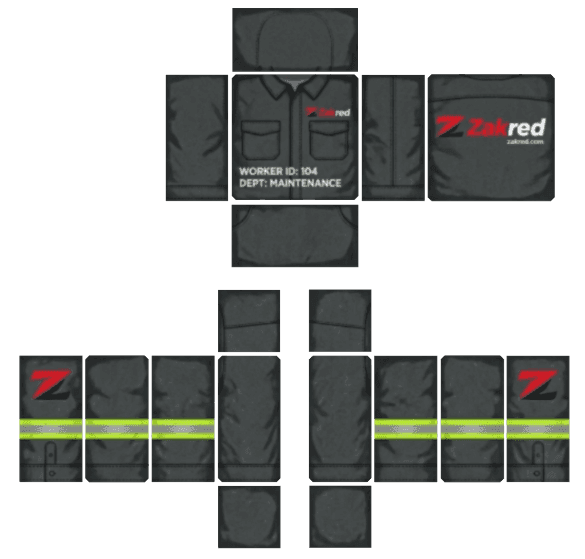
Zakred Worker Textured Suit - Transparent Roblox Shirt Template PNG
Remix in 3DView Details
Zakred Worker Textured Suit
by jacho parrales585×559
Dark Grungy Shaded Suit - Transparent Roblox Shirt Template PNG
Remix in 3DView Details
Dark Grungy Shaded Suit
by Beetech Agency585×559
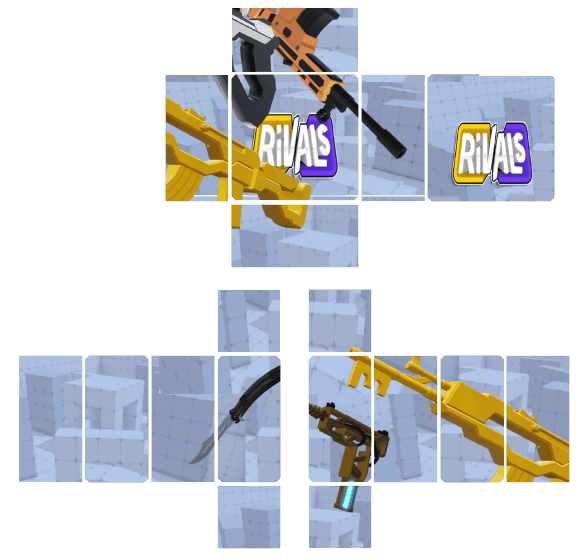
Ultimate Rivals Shaded Set - Transparent Roblox Shirt Template PNG
Remix in 3DView Details
Ultimate Rivals Shaded Set
by nahelde234400585×559
T.U.F.F. Agent Shaded Jacket - Transparent Roblox Shirt Template PNG
Remix in 3DView Details
T.U.F.F. Agent Shaded Jacket
by fer el pron 82585×559
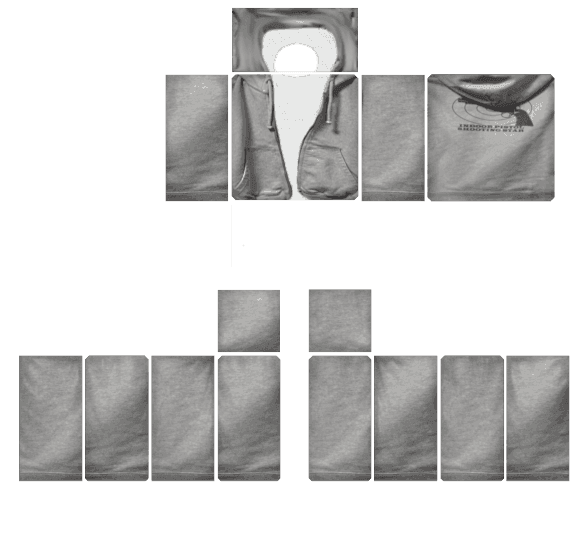
Heather Gray Fleece Tracksuit - Transparent Roblox Shirt Template PNG
Remix in 3DView Details
Heather Gray Fleece Tracksuit
by MD Kamran Ullah 1462585×559
Classic Black Shaded Tracksuit - Transparent Roblox Shirt Template PNG
Remix in 3DView Details
Classic Black Shaded Tracksuit
by MD Kamran Ullah 1462585×559
Explore Full Skins Library for More Shaded Streetwear & Outfits
Common Shading Questions

Roblox Shading Template Questions and Answers

What blend mode and opacity should I use for a Roblox shading template?

Q1

Put your transparent 585 × 559 shading template on a layer right above your base color and set the blend mode to Multiply (or Normal if you are using a see-through PNG). Keep the opacity around 35% to 55% for light and medium colors so the wrinkles look soft and natural instead of too dark.

How do I shade a black shirt on Roblox without the wrinkles disappearing?

Q2

Pure black (#000000) cannot get any darker, so black shadows disappear on top of it. Instead, color your black shirt or hoodie with dark charcoal gray (#1C1C24 to #24242E). That way, the darker shadows and soft white highlights still show up clearly in the game.

What is the difference between a Roblox tee shirt shading template and a classic shirt shading template?

Q3

A classic shirt shading template covers the full 585 × 559 layout, including the chest, back, and full-length sleeves. A tee shirt shading template leaves the bottom half of the arm boxes empty so your avatar’s bare forearms show underneath short sleeves.

Can I use the same 585×559 shading template for both shirts and pants?

Q4

Even though both files use the same 585 × 559 size, shirts and pants need different shading templates. Shirt templates have collar cutouts, chest folds, and elbow creases, while pants templates leave the upper chest blank and add belt loops, pockets, zipper flies, and knee folds.

Why does my shaded shirt look blurry after uploading to Roblox?

Q5

Blurry wrinkles happen when a shading image is stretched from a smaller picture or saved at the wrong size. Always download a full 585 × 559 PNG shading template and keep your text or logos on a clean layer underneath the shading.

Should chest logos go above or below the shading template layer?

Q6

Always put your chest logos, numbers, and stripes BELOW your transparent shading layer. That way, the cloth wrinkles go right across the logo so it looks printed onto the shirt instead of floating like a flat sticker.

HomeTemplatesRoblox Shading Templates for Realistic Clothes
8 Transparent 585×559 Wrinkle & Fold Overlays

Roblox Shading Templates for Realistic Clothes

8 Distinct 585×559 PNGs IncludedShirts, Tees, Hoodies, Jeans, Suits & CorsetsTransparent PNG Ready

If you color a shirt or pants with a plain flat color, it can look like a plastic box in the game. Dropping a see-through Roblox shading template on top of your color adds pre-drawn wrinkles, collar shadows, pockets, and fabric folds in seconds—without having to draw every shadow by hand.

Whether you need a short-sleeve Roblox tee shirt shading template, a baggy Roblox shirt shading template for hoodies and jackets, or a Roblox pants shading template with denim pockets and knee creases, every shading template Roblox creators use must fit the 585 × 559 pixel layout. Scroll through our 8 different Roblox shading template transparent PNGs below, test each Roblox shaded template on a 3D avatar, or open the BloxLux 3D Clothing Editor.

Browse All 8 Shading PNGs (585×559)Open 3D Shading Editor
How Shading Layers Work585 × 559 px

How the 3-Layer Shading Stack Works

Every Roblox shading shirt template goes on the top layer so the see-through wrinkles sit over your colors and logos without covering them up.

L3
Top Layer — Transparent Shading PNGMultiply Mode • 35%–55% Opacity • Wrinkles & Folds
Multiply
L2
Middle Layer — Your Color & LogosNormal Mode • 100% Opacity • Shirt Color & Text
Normal
L1
Bottom Layer — 585×559 Box GuideGuide Only • Hide Before Saving PNG
Guide
Works in BloxLux, Photopea, IbisPaint X & GIMPTest in 3D
8 Different 585 × 559 Transparent Shading Templates

Download Transparent Roblox Shading Templates (Scroll All 8 Styles)

Every clothing style needs its own shape and wrinkle pattern. A short-sleeve T-shirt leaves the lower arms transparent, a hoodie needs a front pouch pocket and hood, and jeans only shade the waist and legs. Scroll sideways through all 8 roblox shading template png styles below to download the 585 × 559 file or test it on the 3D avatar.

Swipe or Scroll (8 Styles)
01 • Crumpled WrinkleTransparent PNG
Classic Crumpled Cloth Shading Template - 585x559 transparent Roblox shading template PNG585 × 559 px

Classic Crumpled Cloth Shading Template

Transparent checkerboard base with organic pinched seam wrinkles & soft folds

The classic all-around Roblox shirt and pants shading template. Features natural crumpled cloth wrinkles around every seam with a clear center so your base color shines through.

585 × 559 PNG35%–50% MultiplyCheckerboard Transparent
02 • Pillow VignetteTransparent PNG
xDoku-Style Pillow & Border Shading Template - 585x559 transparent Roblox shading template PNG585 × 559 px

xDoku-Style Pillow & Border Shading Template

Bold black UV outlines, deep airbrushed edge shadows & soft horizontal bands

Inspired by the popular DeviantArt xDoku shading style. Uses smooth dark border shading around all 18 body boxes with soft horizontal chest and sleeve highlights.

585 × 559 PNG30%–45% MultiplyBold Edge Vignette
03 • Diagonal CreasesTransparent PNG
Diagonal Seam Crease & Cross-Hatch Template - 585x559 transparent Roblox shading template PNG585 × 559 px

Diagonal Seam Crease & Cross-Hatch Template

Crisp angled fabric pull lines from the side seams with a rounded collar dip

Great for clean anime shirts, uniforms, and fitted tops. Features crisp diagonal crease lines pulling inward from the left and right seams across the chest, back, and sleeves.

585 × 559 PNG35%–50% MultiplySharp Seam Lines
04 • Soft AirbrushTransparent PNG
Soft Airbrush Mist & Smooth Fold Template - 585x559 transparent Roblox shading template PNG585 × 559 px

Soft Airbrush Mist & Smooth Fold Template

Feathery light-gray airbrushed clouds & gentle diagonal fabric ripples

Made for white, pastel, and Y2K aesthetic clothes where heavy black shadows would look too harsh. Adds a soft, cloudy airbrushed texture across the whole outfit.

585 × 559 PNG25%–40% MultiplySoft Pastel Ready
05 • Dark & Black ClothesTransparent PNG
Dark Charcoal & Black Clothing Shading Template - 585x559 transparent Roblox shading template PNG585 × 559 px

Dark Charcoal & Black Clothing Shading Template

Pre-shaded dark charcoal fabric with lighter fold ridges for black outfits

Normal shadow layers disappear on pure black clothes. This dark-base template uses deep charcoal tones and soft gray highlights so every wrinkle stands out on black shirts and pants.

585 × 559 PNGDark Base ReadyCharcoal Highlights
06 • Shoulder & ElbowTransparent PNG
Minimalist Shoulder & Joint Fold Template - 585x559 transparent Roblox shading template PNG585 × 559 px

Minimalist Shoulder & Joint Fold Template

Focused armpit tension lines, waist tucks & middle elbow bend creases

Places wrinkles only where clothes bend—at the shoulders, waist, elbows, and wrists—leaving the middle of the chest completely clean for your front logos and decals.

585 × 559 PNG30%–45% MultiplyClean Center Chest
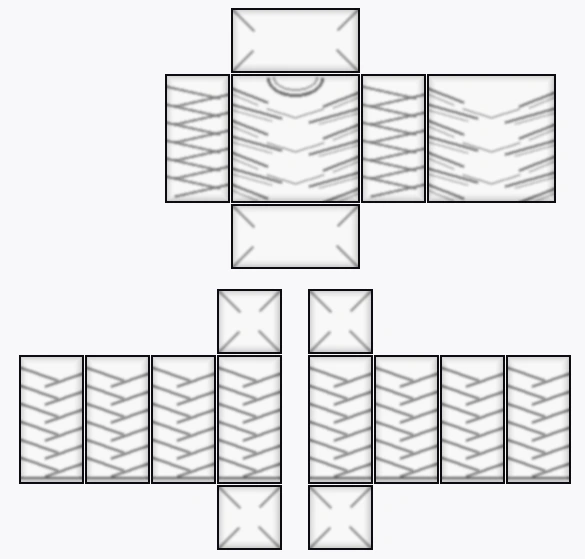
07 • Line-Art HoodieTransparent PNG
DevForum Line-Art Hoodie & Pocket Template - 585x559 transparent Roblox shading template PNG585 × 559 px

DevForum Line-Art Hoodie & Pocket Template

Drawn hood collar cutout, front drawstrings, kangaroo pouch & ribbed cuffs

Modeled after the classic Roblox DevForum hoodie template. Includes a round neck opening, back hood lines, hanging drawstrings, a front pouch pocket, and ribbed cuffs.

585 × 559 PNG40%–60% MultiplyHood + Pocket + Cuffs
08 • Heavy RealisticTransparent PNG
Heavy Realistic Cloth Drape & Pants Template - 585x559 transparent Roblox shading template PNG585 × 559 px

Heavy Realistic Cloth Drape & Pants Template

Deep U-shaped chest drapes & hand-painted baggy sleeve and leg creases

Built for heavyweight streetwear, oversized sweaters, and baggy cargo pants or jeans. Combines deep U-shaped torso drapes with realistic stacked folds down the arms and legs.

585 × 559 PNG45%–60% MultiplyShirts + Baggy Pants
Live 3D Wrinkle & Seam Previewer

Interactive 3D Shading Studio (Test All 8 Templates Live)

See how each Roblox shading template 585 x 559 wraps around the 3D chest, arms, waist, and legs. Pick any of the 9 presets on the left to swap the live texture, and spin the avatar 360° across Blocky, Boy, and Girl bodies.

Select 3D Shading Preset9 Live Maps • Scroll ↓
Ready for Your Own Colors & Logos

Want to put these shading layers over your own shirt or pants colors? Open the 3D Editor to stack layers and paint live.

Open 3D Shading Editor
Loading 3D Avatar Preview...
Viewing Complete Shaded Outfit (Hoodie + Jeans)
Complete Shaded Outfit (Hoodie + Jeans)2D UV Map
Easy Shading Settings Guide

Multiply Opacity Settings and How to Shade Black Clothes on Roblox

The biggest mistake beginners make with a Roblox shaded shirt template is leaving the shadow layer at 100% opacity or using pitch black (#000000) underneath a shadow layer. Here are the best settings for every color.

01 • Best Opacity Setting35% – 55% Opacity

Setting Your Shading Layer Opacity

When you drop a Roblox shading template transparent PNG over a colored shirt, set the layer mode to Multiply. For white, pastel, and bright colors, turn the shading layer opacity down to 30%–45% so the wrinkles look soft and clean instead of muddy gray.

02 • Black Clothing Trick#1C1C24 Base Color

How to Shade a Black Shirt or Hoodie

If you fill a shirt with pure black (#000000), dark shadows won’t show up at all. When using a Roblox shading template for black shirt or dark hoodies, color your shirt with dark charcoal gray (#1C1C24 to #24242E) so the darker wrinkles and light folds stand out in-game.

03 • Short Tee vs Long SleeveShort vs Full Arms

Short-Sleeve Tee Shading vs Full-Sleeve Shirt Shading

A Roblox tee shirt shading template leaves the bottom half of the arm strips completely transparent so your avatar’s bare forearms show below the short-sleeve cuff. If you are making a long-sleeve sweater, jacket, or hoodie, use a full-sleeve template that covers the entire arm down to the wrist.

04 • Clean Side SeamsFits R15 & R6

Why Wrinkles Need to Line Up Across All 4 Sides

Real clothes bunch up where your body bends—under the arms, at the elbows, around the waist, and behind the knees. All 8 of our 585 × 559 shading templates line up the folds at the exact same height across the Front, Left, Back, and Right boxes so your wrinkles connect smoothly around the body.

Recommended Shading Settings for Different Clothing Colors

Tested for Roblox In-Game Lighting
Clothing TypeBest Base Color HexShading Layer OpacityHighlight TipBest Template to Use
White & Light Pastel Tees#F4F4F8 – #FFE6EE30% – 40% Multiply10% Soft WhiteShort-Sleeve Tee or Classic Shirt
Bright Streetwear & Jerseys#3B82F6 / #9965E545% – 55% Multiply15% Chest HighlightClassic Shirt or Zip-Up Jacket
Black & Dark Grunge Hoodies#1C1C24 – #25253060% – 75% Multiply15% – 20% Light GrayOversized Hoodie & Pocket
Baggy Jeans & Suit Outfits#2B4C7E / #23252E45% – 60% Multiply15% Front Knee & LapelDenim Jeans or Suit Blazer
Step-by-Step 3D Shading Guide

How to Use Roblox Shading Templates in the BloxLux 3D Editor

You don’t need complicated computer software to use a Roblox shading template. Inside the BloxLux 3D Web Editor, you can upload any see-through shading PNG, brush your own soft shadows with the Airbrush tool, and add pre-shaded 3D accessories while watching your avatar update live.

Uploading a 585x559 transparent Roblox shading template into the BloxLux 3D clothing editor
Painting custom wrinkle shadows on a Roblox shading template using Airbrush softness and opacity controls
Adding pre-shaded 3D accessories with built-in drop shadows onto a Roblox shirt shading template
Step 01 of 03•Layer Stacking

Drop Any 585×559 Transparent Shading Template Over Your Color

Stack see-through wrinkle overlays right on top of your shirt or pants color in seconds

Open 3D Web Editor

First, color your shirt or pants with any solid color you like. Next, open the Uploads tab on the left and upload one of our 585×559 transparent shading PNGs. Because the shading file is see-through, your base color and chest logos show right through underneath the wrinkles.

Lines up automatically with the 585×559 Shirt or Pants layout
Keeps your base colors and chest logos visible underneath
Updates the 3D character right away so you can check the folds

Helpful Tip — When making a black shirt or hoodie, use dark charcoal gray (#1C1C24) instead of pitch black (#000000) so the dark wrinkles still show up clearly.

Pre-Shaded Community Outfits

Popular Shaded Shirts and Outfits Ready to Remix

See how top creators shade hoodies, suits, jackets, and jeans—or click Remix in 3D to edit any outfit.

8 Shaded Outfits
Dark Sorcerer Shaded Uniform - Transparent Roblox Shirt Template PNG
Remix in 3DView Details
Dark Sorcerer Shaded Uniform
by coolkid585×559
Shadow Stalker Shaded Coat - Transparent Roblox Shirt Template PNG
Remix in 3DView Details
Shadow Stalker Shaded Coat
by Zoro585×559
Zakred Worker Textured Suit - Transparent Roblox Shirt Template PNG
Remix in 3DView Details
Zakred Worker Textured Suit
by jacho parrales585×559
Dark Grungy Shaded Suit - Transparent Roblox Shirt Template PNG
Remix in 3DView Details
Dark Grungy Shaded Suit
by Beetech Agency585×559
Ultimate Rivals Shaded Set - Transparent Roblox Shirt Template PNG
Remix in 3DView Details
Ultimate Rivals Shaded Set
by nahelde234400585×559
T.U.F.F. Agent Shaded Jacket - Transparent Roblox Shirt Template PNG
Remix in 3DView Details
T.U.F.F. Agent Shaded Jacket
by fer el pron 82585×559
Heather Gray Fleece Tracksuit - Transparent Roblox Shirt Template PNG
Remix in 3DView Details
Heather Gray Fleece Tracksuit
by MD Kamran Ullah 1462585×559
Classic Black Shaded Tracksuit - Transparent Roblox Shirt Template PNG
Remix in 3DView Details
Classic Black Shaded Tracksuit
by MD Kamran Ullah 1462585×559
Explore Full Skins Library for More Shaded Streetwear & Outfits
Common Shading Questions

Roblox Shading Template Questions and Answers

What blend mode and opacity should I use for a Roblox shading template?

Q1

Put your transparent 585 × 559 shading template on a layer right above your base color and set the blend mode to Multiply (or Normal if you are using a see-through PNG). Keep the opacity around 35% to 55% for light and medium colors so the wrinkles look soft and natural instead of too dark.

How do I shade a black shirt on Roblox without the wrinkles disappearing?

Q2

Pure black (#000000) cannot get any darker, so black shadows disappear on top of it. Instead, color your black shirt or hoodie with dark charcoal gray (#1C1C24 to #24242E). That way, the darker shadows and soft white highlights still show up clearly in the game.

What is the difference between a Roblox tee shirt shading template and a classic shirt shading template?

Q3

A classic shirt shading template covers the full 585 × 559 layout, including the chest, back, and full-length sleeves. A tee shirt shading template leaves the bottom half of the arm boxes empty so your avatar’s bare forearms show underneath short sleeves.

Can I use the same 585×559 shading template for both shirts and pants?

Q4

Even though both files use the same 585 × 559 size, shirts and pants need different shading templates. Shirt templates have collar cutouts, chest folds, and elbow creases, while pants templates leave the upper chest blank and add belt loops, pockets, zipper flies, and knee folds.

Why does my shaded shirt look blurry after uploading to Roblox?

Q5

Blurry wrinkles happen when a shading image is stretched from a smaller picture or saved at the wrong size. Always download a full 585 × 559 PNG shading template and keep your text or logos on a clean layer underneath the shading.

Should chest logos go above or below the shading template layer?

Q6

Always put your chest logos, numbers, and stripes BELOW your transparent shading layer. That way, the cloth wrinkles go right across the logo so it looks printed onto the shirt instead of floating like a flat sticker.